App analytics for webview apps: What you can & can’t track

Web analytics tools like GA4 work in webview apps, but only partially. You can still track page views, clicks, and form submissions — but you’ll miss native metrics like installs, crashes, push opens, and deep link performance. To close that gap, pair your webview analytics with native tools like Firebase, Adjust, or Branch. A combined setup gives you full visibility into user behavior and app performance.
Turning your website into a webview app is a smart choice for three key reasons: Faster development, lower maintenance, and a consistent experience across platforms.
But, it’s important to consider some of the potential drawbacks too, namely: limited visibility into how your app performs in a native mobile environment.
While traditional web analytics can still track many events inside your app, they weren't built to capture app installs, crashes, push notification interactions, or deep link behaviors. Without the right setup, you risk flying blind when it comes to critical mobile metrics like retention, attribution, and app stability.
Whether you're launching your first webview app or scaling an existing hybrid solution, analytics play a crucial role in product optimization, user engagement, and ROI measurement.
Enter your URL to build a webview app now
In this post, we’ll break down:
What you can track with your existing web analytics tools
What you’re likely missing
And what tools can help you close the gap
What are app analytics?
App analytics are data points and measurements that help you understand how users interact with your app (for a website, they would be called web analytics). This includes metrics like:
Page views
Button clicks
Time on screen
Conversion rates
Retention and churn
Traffic sources
For mobile apps, analytics can also track things like:
App installations
First-time launches
Clicks on native app elements
Crashes and exceptions
Push notification opens
Deep link performance
These insights are critical for making informed product decisions, running experiments, and improving the user experience.

Want to know how it all works?
Get hands-on with Median’s comprehensive documentation, and build your app with ease.

Can I use web analytics tools (Like GA4) in webview apps?
The short answer is: Yes.
If your webview app is just a wrapper around your existing website, your current web analytics setup (e.g., GA4, Mixpanel, Plausible) will mostly continue working as-is.
Your webview will load the same site, with the same scripts, including your analytics tags.
This all means that you can still track:
Page views and screen transitions
Form submissions
CTA clicks
Ecommerce events
Onboarding flows and drop-offs
However, web analytics tools will not be aware that your website is now running inside an app. They see it as just another mobile browser. This is why it is important to distinguish between web and app traffic.
With the Median.co platform, you have various methods to detect app usage, whether you want to implement custom user agents, HTTP headers or use a different URL for the website you wrap around.
What key analytics might be missing in webview apps?
Using web-only analytics in a mobile app environment creates blind spots. Here is a comprehensive view of the major limitations:
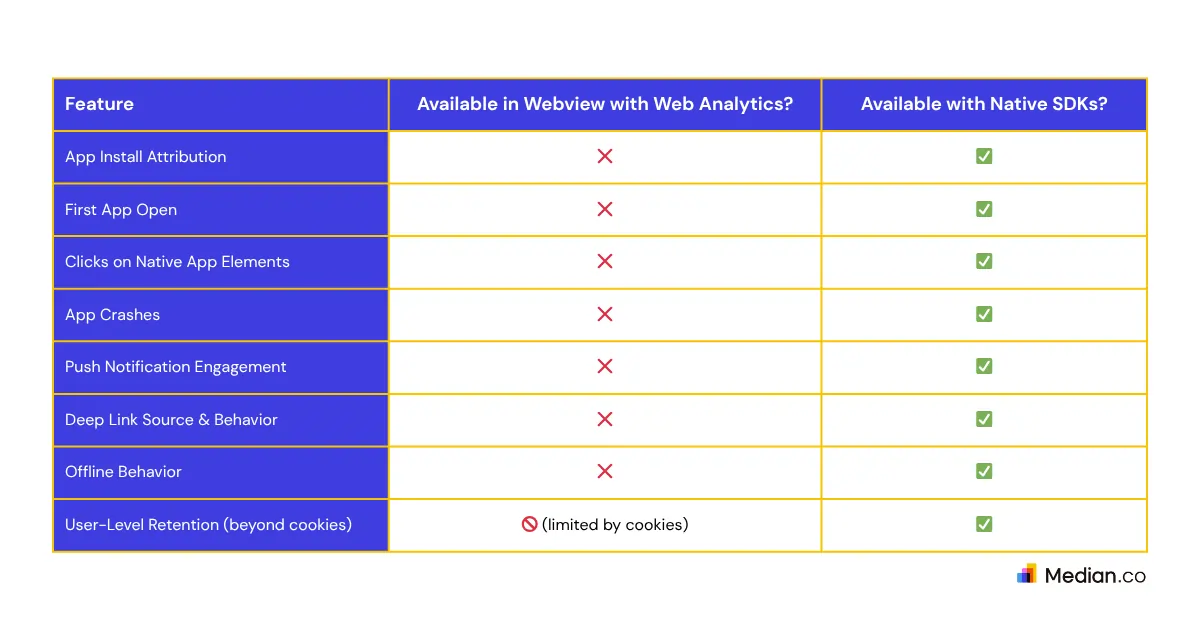
If you're serious about understanding full app performance, web analytics alone won't cut it. You'll need to complement it with native tooling.
Can I use web analytics tools (Like GA4) in webview apps?
While web analytics tools like Google Analytics 4 (GA4) can provide some insights within a webview, they often fall short when it comes to understanding the full picture of user behavior in hybrid or native mobile apps.
To get a more complete view — from install attribution to in-app engagement — you’ll likely need additional tools that are purpose-built for mobile environments. Here's a breakdown of key areas to track and the tools that can help:
1. Installation attribution
Understand where users came from (ads, social links, referrals) when they first installed your app.
Tools to Consider:
Use Case: Want to know if a TikTok ad drove app installs and purchases? You’ll need an attribution tool for that.
2. Deep link analytics
Track how users interact with deep links from ads, emails, and social media—and whether those links led to conversions.
Tool to Consider:
Branch.io (deep linking + attribution)
Use Case: A user clicks a promotional email, opens the app, and lands on a product page. Did it work as expected? Branch can tell you.
3. App performance & crash reporting
Web analytics won’t tell you if your app crashes or lags when loading the webview.
Tools to Consider:
Sentry (Mobile SDK)
Use Case: Users on Android 13 are bouncing within seconds. Is it a crash? Firebase can tell you.
4. In-app events & engagement
For more app-like metrics such as session time, custom events, or feature usage, a native SDK is key.
Tools to Consider:
Use Case: Measure whether users who saw onboarding screens are more likely to create an account or complete a purchase.
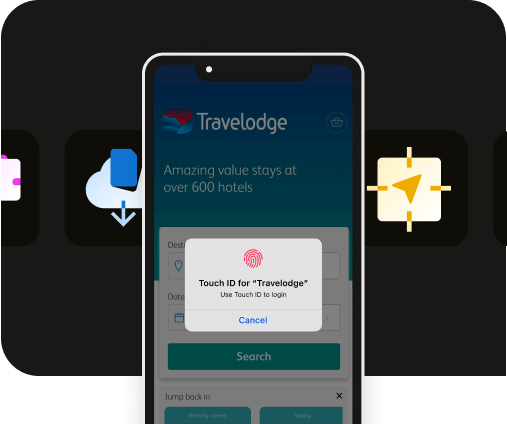
Want to learn more about our plugins?
Launch a full-feature native app without native development!

How do you combine web and native analytics in webview apps?
If your app uses a hybrid approach (webview + native code), here’s how to layer analytics:
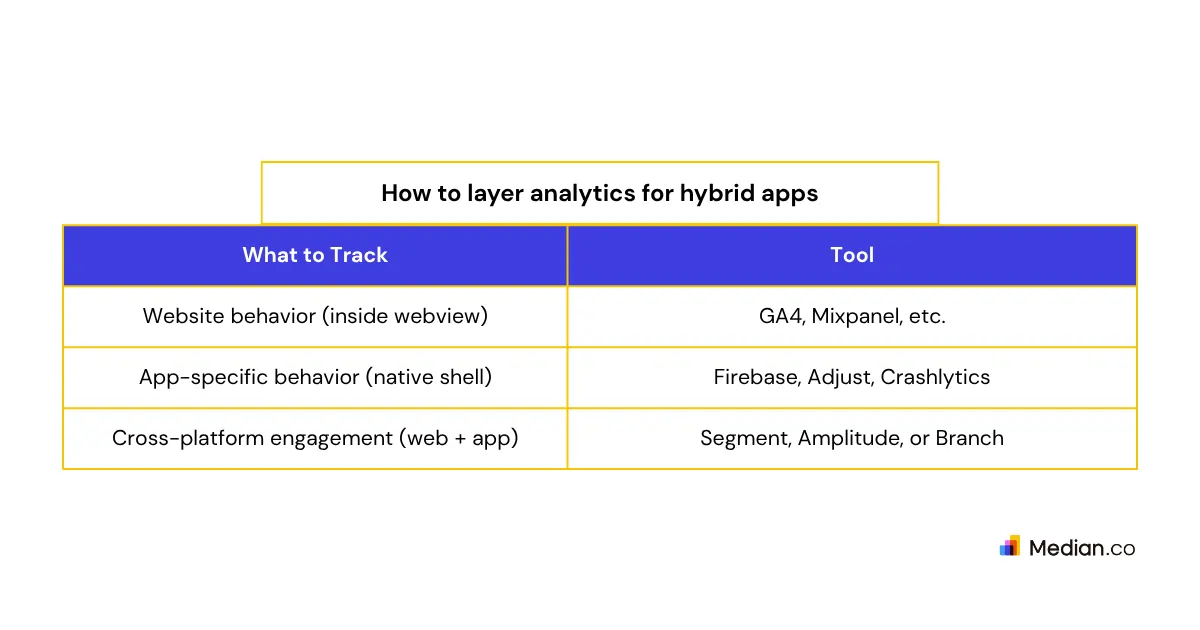
General Tips:
Use custom events or bridge communication to sync native events back to your web analytics tools.
If using Branch, integrate deep links in both your native and web environments.
If using Firebase, add the Firebase Web SDK to your website and the native SDK to your app shell.
Summary
Webview apps let you go to market faster by reusing your website code - but tracking and understanding user behavior isn’t as simple as copying your analytics setup.
Key Takeaways:
✅ You can reuse web analytics (like GA4) in your webview.
✅ But you’ll miss out on install, crash, offline, and deep link data.
✅ Tools like Firebase, Adjust, AppsFlyer, and Branch can fill those gaps.
✅ A combined strategy - web and native - provides the best visibility into user behavior and product performance.
Looking to track webview analytics end-to-end?
Consider using Firebase for app-side events and GA4 for webview-side activity. Then stitch the data together using user IDs, cookies, or backend logic.
Frequently asked questions
Can I track user activity in a webview app using Google Analytics 4 (GA4)?
Yes, GA4 can track web-based events like page views, button clicks, and form submissions inside a webview app. However, it won’t capture native app data like installs, crashes, or push notifications unless combined with native analytics tools.
What analytics data am I missing in a webview app?
Webview-only setups can’t track install attribution, deep link performance, crash reports, or native element interactions. These blind spots can limit your ability to measure true app performance and retention.
How do I combine web and native analytics in a hybrid app?
Use your usual web analytics setup (GA4, Mixpanel) inside the webview, and add native SDKs like Firebase or Adjust in the app shell. Sync key events across both using user IDs or custom event bridges.
Do I need special tools to track deep links and installs in webview apps?
Yes. Tools like Branch, AppsFlyer, or Adjust are required to monitor deep links, install attribution, and post-install events that web analytics tools can’t detect.
Can I get the UDID of a user inside a webview app for analytics or testing?
No — Apple restricts access to the UDID for privacy reasons, especially in production apps. If you need to get UDID for internal testing, use tools like Median.co’s UDID retrieval tool, but this is only suitable for TestFlight or pre-release workflows. For live analytics, rely on anonymized identifiers like GA4 client IDs or Firebase App Instance IDs.

to top
Related articles