How to prepare Android apps for Google Play’s 16 KB page size requirement

TL;DR: Starting November 1, 2025, all Android apps targeting Android 15+ must support 16 KB memory page sizes to stay on Google Play. This update improves app performance, battery efficiency, and reliability. Developers should update tooling (NDK r28+, AGP 8.5.1+), remove hardcoded 4 KB values, test on emulators and Pixel devices, and release updates ahead of the deadline. If you’re using Median App Studio, staying compliant is simple — regularly update your app in the Studio to ensure it always meets Google’s latest requirements.
Google has announced a key change that will affect all developers building for Android 15 and above. Beginning November 1, 2025, apps submitted to Google Play must support 16 KB memory page sizes.
This update reflects the shift toward modern hardware optimizations and is designed to deliver faster app performance, improved efficiency, and better end-user experiences.
Enter your URL to build an Android app now
Why Google Play requires 16 KB page size support
A larger memory page size allows for Android to make better use of a device’s hardware. Google’s internal benchmarks show notable improvements when running on 16 KB systems; these improvements include:
App launch times: 3%–30% faster depending on the workload
Battery life: Approximately 4.5% longer runtime
Camera startup: 4.5%–6.6% faster to open
System boot: Up to 8% faster.
For developers, meeting this requirement ensures compliance while also delivering faster, more reliable experiences for users.
Preparing your Android app: Developer checklist for 16 KB support
Supporting 16 KB page sizes doesn’t require a complete rebuild of your app, but it does mean making some updates.
Here are the most important steps developers should take to stay compliant and ensure smooth performance.
Step 1: Recompile with the latest tooling
If your app uses native code (C/C++ through the NDK) or depends on SDKs that do, rebuild your project with NDK r28 or higher and the Android Gradle Plugin 8.5.1+. These updated versions automatically handle the correct memory alignment and prevent compatibility issues.
Step 2: Remove hardcoded page-size values
Some apps still assume a fixed 4 KB page size. This creates problems on modern devices. Instead of hardcoding values, call functions like:
getpagesize()OR
sysconf(_SC_PAGESIZE)so your app adjusts seamlessly across both 4 KB and 16 KB devices.
Step 3: Use Android Studio’s built-in checks
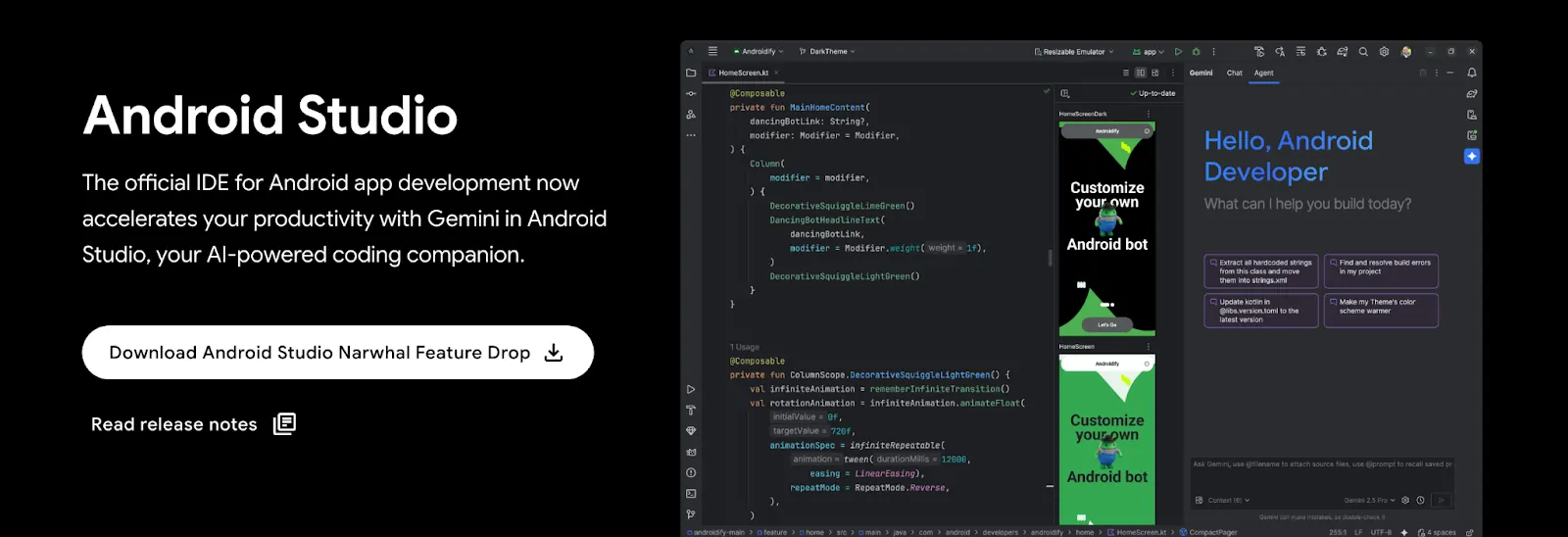
Source: https://developer.android.com
Android Studio now offers several safeguards to help you confirm compliance before release:
APK Analyzer to verify .so library alignment
Lint warnings during the build process for non-compliant code
On-device alerts if a library fails to align correctly
16 KB emulator targets in AVD Manager to test apps in a controlled environment
By following this checklist, developers can ensure their apps are not only Google Play compliant but also optimized for the performance improvements that 16 KB page sizes bring.
Instant app store facelift. No designer required.
Unlock Median’s 500+ free Figma app store screenshot templates designed to meet iOS and Android guidelines. Your app will look its best across platforms, resulting in more downloads and a more powerful app store presence.
Testing your Android app on real devices
Running tests in the emulator is important, but validating performance on actual hardware is the only way to be confident your app is ready for users. With Android 15 and newer, Google has made this easier by adding direct support for 16 KB testing.
1. Use supported Pixel devices
On Pixel devices running Android 15 QPR1 or later, you can enable 16 KB memory page sizes directly in Developer Options.
This allows you to test how your app behaves in a real-world environment before release.
2. Verify with ADB
You can confirm the page size your device is using with a simple command:
With this, you will know exactly whether the device is running at 4 KB or 16 KB, and can validate that your app handles both correctly.
3. Combine emulator + physical testing
While the AVD Manager in Android Studio now supports 16 KB configurations, testing on a physical device adds another layer of assurance.
Using both together gives developers the confidence that apps will behave consistently across different environments.
Future requirements for Android 16 and beyond
Although 4 KB page sizes will remain supported for now, preparing your app ensures long-term stability. With Android 16, Google will expand runtime compatibility and improve ART optimizations for 16 KB hardware.

Want to know how it all works?
Get hands-on with Median’s comprehensive documentation, and build your app with ease.

How to prepare your Android app for the November 1, 2025 deadline
To comply with Google Play’s November 1, 2025 requirement, developers should:
Audit dependencies for native code.
Upgrade to NDK r28+ and AGP 8.5.1+.
Remove hardcoded 4 KB page-size values.
Use Android Studio tools (Lint, APK Analyzer) to validate compliance.
Test apps across emulators and real devices.
Release compliant updates before the enforcement date.
Keep your Median app up to date
Using Median App Studio to manage your mobile app, staying compliant is even simpler.
Just make sure to regularly update your app through the App Studio. Median automatically integrates the latest NDK and AGP versions under the hood, so your builds remain aligned with Google Play’s requirements. By republishing your app on a consistent schedule, you’ll keep compatibility up to date without needing to manually reconfigure your build process.
Want to learn more about our plugins?
Launch a full-feature native app without native development!


Summary
Google’s move to 16 KB memory page sizes will reshape Android performance standards. Starting November 1, 2025, Play Store submissions must be aligned to this requirement. Developers who prepare early will see:
Faster performance in launches and system processes
Improved battery efficiency across devices
Stronger reliability across phones, tablets, and TVs
By updating your tools, testing thoroughly, and removing outdated assumptions, your app will be ready for the next generation of Android hardware.
Enter your URL to build a free Android app now
Frequently asked questions
What is the deadline for supporting 16 KB page sizes on Android apps?
Starting November 1, 2025, all apps submitted to Google Play targeting Android 15 and higher must support 16 KB memory page sizes. Apps that do not meet this requirement may be rejected from the Play Store.
How does this requirement affect web to APK conversions?
If you’re converting a web app to APK, the generated Android app must still comply with Google Play’s 16 KB page size requirement. Platforms like Median App Studio handle this automatically, ensuring your converted apps meet Google’s latest standards without extra developer setup.
Do I need to update my iOS app too, or only Android?
This requirement only applies to Android. However, iOS has its own compliance processes. For example, if you’re preparing to install an IPA on iPhone for testing or distribution, you should still ensure your build environment is up to date with Apple’s current guidelines.
How can I test if my app is running on a 16 KB system?
You can check memory page size by running adb shell getconf PAGE_SIZE on a supported Android 15+ device. If the output is 16384, the device is using 16 KB pages. If it is 4096, it’s still 4 KB. This confirms whether your app is running under the new configuration.
What role does the UDID process play in app testing?
When testing iOS builds, developers often need to get a UDID (Unique Device Identifier) to register a device for installation. While this is separate from Android’s 16 KB page size change, both processes highlight the importance of aligning app builds with platform-specific technical requirements.

to top
Related articles