How to request the “Urgent/Expedite Request” for immediate release of iOS apps

The five steps needed to request a faster App Store review time are: signing into your Developer account, selecting the appropriate form, filling out the required account information and the app information, double-checking everything for accuracy, and submitting the form to Apple.
Apple’s App Store review process typically takes anywhere from 24-48 hours to complete. However, it can also take up to a few weeks, and sometimes app builders need faster App Store review times to get their app approved by Apple.
Sometimes app developers face urgent situations where they need to fix a bug in their app, or release their app in lieu of an upcoming event. In these situations, a faster app review becomes a necessity. This is why Apple offers a way to expedite the review process.
But note: Expedited reviews are allocated on a limited basis, and Apple does not guarantee that every request submitted will be processed.
Enter any URL to build your app
Steps to request the “Urgent/Expedite Request” for urgent release of your iOS app to the Apple App Review team
Step 1: Sign into your Apple Developer account
The very first step to request an urgent release of your app from the App Review team is to sign into your Apple Developer account.
From there, you need to navigate to the request form. To save you the navigation process and time, follow the link here to log into your Developer account and get to the form faster.
Step 2: Select the appropriate form in the drop-down menu
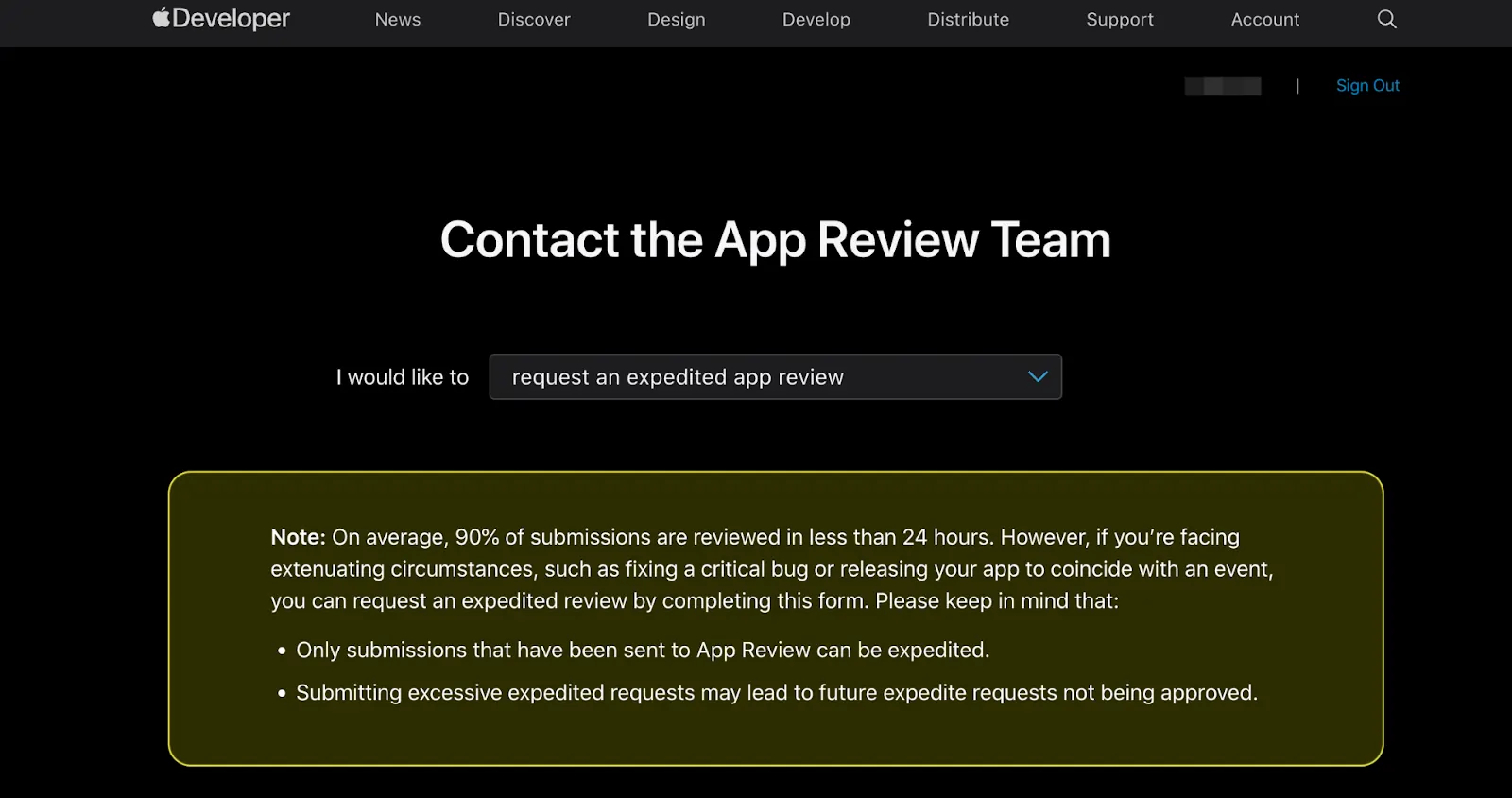
The second step in this process is to select the option ‘Request an expedited app review” from the dropdown menu that will appear (see image below):
Step 3: Fill out the required account information
The next step is to fill out the required Apple Developer account information — this should be the same account you created your iOS app with.

Step 4: Fill out the required app information
The next step is to fill out the required app information of the app you need an expedited App Store review for.
Filling out the wrong information will delay the review time and may even cause your app to be rejected by the App Store.

Step 5: Check for accuracy
Next is to check all the information filled out in the form is accurate. Making any mistakes here or withholding information may lead to the request getting rejected.
Step 6: Submit your request
The last step is to click the send button to submit your request.

Requesting a faster review time is straightforward. Following the above steps should set you in the right direction.
Conclusion
It can take up to six months to a year to create, perfect, and publish an app. Although, when it's ready, the process of publishing your app to the App Store itself can take between 24-48 hours to complete.
Sometimes urgent situations arise where you need your app published faster — for instance, fixing a bug, or aligning the release of your app with an event that’s crucial to your overall business goals.
In those timely instances, an expedited app review is needed. You can request this by filling out and submitting the “Urgent/Expedite Request” form via your Apple Developer account.
However, if at any point you get stuck, or need Median.co to take care of the entire publishing process for you, then book a call and talk to one of our experts!
Frequently asked questions
How do I submit an urgent or expedite request for the immediate release of my iOS app?
To request an urgent or expedite release for your iOS app, you need to contact Apple Developer Support directly through the Apple Developer Contact page. Provide a clear explanation of the reason for the expedited review, including any time-sensitive issues or critical bug fixes. Apple reviews these requests on a case-by-case basis and prioritizes them accordingly.
What information should I include when submitting an expedite request for my app release?
When submitting an expedite request, include your app’s name, Apple Developer account details, app version number, and a concise reason for urgency such as a critical bug, legal issue, or business impact. Be sure to explain why the standard review timeline would cause significant problems. Providing detailed and valid reasons increases the chances of approval.
3. Can I get UDID information as part of an urgent request for app testing and release?
While the UDID (Unique Device Identifier) is essential for registering devices for beta testing and app development, it is not directly related to expedite requests. However, if you need to quickly test your app on specific devices before release, make sure to get UDID numbers from testers early and register them in your Apple Developer account to avoid delays during the expedited review process.

to top
Related articles