Mobile app onboarding for webview: A practical guide

Webview apps offer a fast way to turn your website into a mobile app. But without effective onboarding, users may be confused or disengage quickly. This guide outlines onboarding best practices for webview apps and shows how to implement and measure a successful flow.
Building a webview app is an efficient way to bring an existing web experience to mobile users without creating a fully native app from scratch.
But: Launching a webview app isn't as simple as embedding your website. You also need to onboard users properly to ensure they understand how to interact with your app and what to expect.
Enter your URL to build a webview app now
It matters: A tailored onboarding experience can help boost user trust, reduce bounce rates, and even improve your chances of passing App Store review, especially if your app behavior differs from fully native expectations.
In this guide, we’ll explore why onboarding matters for webview apps, best practices to follow, and practical steps to design and implement onboarding in your app.
Why is onboarding important for webview apps?
Webview apps wrap a website in a native mobile shell — a fast and cost-effective way to reach mobile users. But because users expect native app behaviors, simply embedding a web experience isn’t enough.
Common challenges with webview apps include:
Users expecting "native" app behavior but encountering web-like interfaces
webview limitations (e.g., missing gestures, offline support) surprising users
Potential App Store rejection if the app doesn't clearly explain its purpose and functionality
Effective onboarding helps address these issues by:
Setting clear expectations for what the app offers
Explaining any webview-specific behavior users might notice
Building early trust with a polished first-time user experience
Instant app store facelift. No designer required.
Unlock Median’s 500+ free Figma app store screenshot templates designed to meet iOS and Android guidelines. Your app will look its best across platforms, resulting in more downloads and a more powerful app store presence.
What to include in a webview app onboarding flow
A good onboarding experience helps users get up to speed quickly and sets the tone for how they'll interact with your app. Here are a few essentials to keep in mind:
Introduce the app clearly. Give users a quick sense of what your app does and why it matters. Keep it short, and focus on the value they'll get right away.
Explain permissions upfront. If you're asking for things like location, camera, or push notifications, let users know why early on. Don’t wait for the system prompt—give them context beforehand.
Note any connectivity requirements. If your app needs an internet connection to work, mention it. Users appreciate knowing this upfront, especially in webview-based experiences.
Clarify sign-in requirements. If users need to log in before using core features, guide them through that process early and make it easy to create an account or recover a password.
Make support easy to find. If something breaks or doesn’t load right, users should know where to go for help. Build in access to support, even during onboarding.
How to implement onboarding in webview apps
Even though your app may rely heavily on web content, onboarding is best handled natively to ensure a smooth and flexible experience. Here’s a high-level step-by-step to get started:
Add a native splash screen. Make sure the first thing users see is polished and branded, even while your webview content is loading in the background.
Detecting first-time users. Check whether the user is opening the app for the first time so you can decide whether to show onboarding or jump straight into the main experience.
Display onboarding screens. Use your preferred native framework to present onboarding before loading the webview. This helps control timing and design more precisely.
Save completion status. Track whether the user has completed onboarding using something like UserDefaults (iOS), SharedPreferences (Android), or browser cookies.
Launch onboarding only once. Once a user finishes onboarding, future app launches should skip straight to the webview experience.
Track user progress. Add analytics to your onboarding flow so you can see where users drop off, what’s working, and where to improve.
Want to learn more about our plugins?
Launch a full-feature native app without native development!

How to measure the effectiveness of your onboarding flow
Designing a beautiful onboarding experience is only half the battle –- you also need to measure how it performs. Tracking key onboarding metrics helps you understand user behavior, identify friction points, and iterate toward a smoother experience.
Tracking your onboarding performance is similar to tracking the effectiveness of your user journey. The most important metrics (aside from product-based metrics of your application) and why they matter are:
Onboarding completion rate
What it tells you: The percentage of users who finish all onboarding steps.
Why it matters: A low completion rate suggests your onboarding is too long, confusing, or not engaging enough. Aim for at least 70–80% completion.
Drop-off by screen
What it tells you: Where users abandon the onboarding flow.
Why it matters: Identifying which screen causes the most exits can highlight content that needs simplification or clearer messaging.
Skip rate
What it tells you: How many users choose to skip onboarding (if you offer the option).
Why it matters: High skip rates can signal that users are already familiar with your app — or that the onboarding isn’t perceived as valuable.
Engagement after onboarding
What it tells you: Whether users who complete onboarding stay engaged (e.g., session duration, actions taken, or pages viewed).
Why it matters: This helps you measure not just onboarding success, but how well it sets up long-term usage.
First-session retention (day 0/day 1)
What it tells you: The percentage of users who come back after their first session.
Why it matters: This is a strong indicator of onboarding effectiveness. If users leave and never return, onboarding likely didn’t communicate enough value.
In webview apps, you can typically use your webbased analytics such as Google Analytics, Google Firebase, Mixpanel or Open Web Analytics to measure the metrics above.

Want to know how it all works?
Get hands-on with Median’s comprehensive documentation, and build your app with ease.

Is there any additional support to accelerate the onboarding?
To speed up onboarding implementation and testing, consider no-code or low-code digital adoption platforms. These tools offer flexible onboarding components, cross-platform support, and built-in A/B testing.
Popular platforms include:
Pendo: A product experience platform that helps guide users, collect feedback, and analyze behavior across web and mobile apps
WalkMe: A digital adoption platform offering interactive, on-screen guidance to simplify complex user flows
Stonly: A no-code solution for creating step-by-step, interactive guides that adapt to user behavior
Gainsight: A customer success platform that includes onboarding tools to drive product adoption and retention through guided experiences
Alternatively, you may be able to harvest the power of your existing push integration and use features like In-App Messages to Guide the user. A great example here is OneSignal In-App Messages.
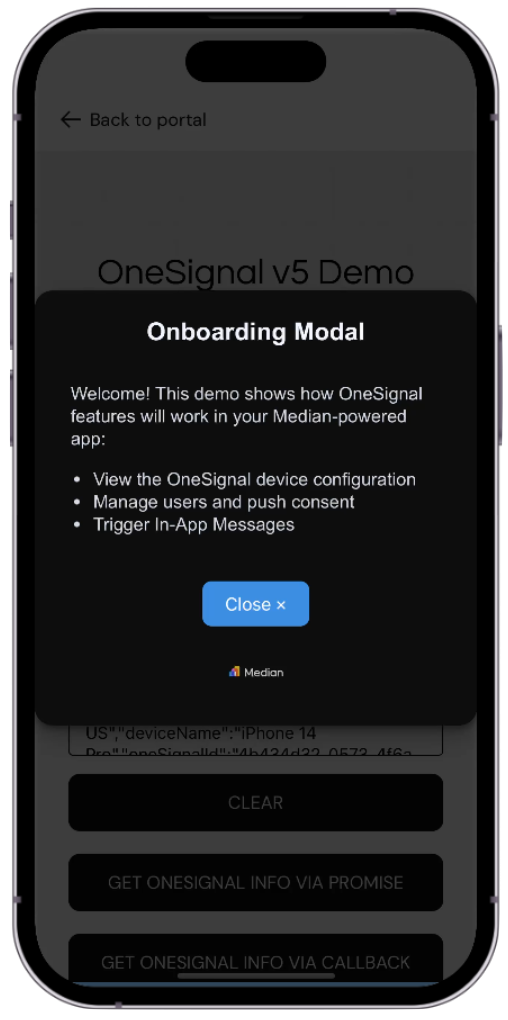
Onboarding with OneSignal In-App Messages
Summary
Webview apps offer a fast, efficient way to bring your web experience to mobile — but real success takes more than just wrapping your site in a native shell.
A well-designed onboarding flow plays a key role in helping users understand what your app does, how it works, and what to expect from a web-based mobile interface.
Effective onboarding for webview apps should:
Clearly explain your app’s purpose and value.
Set expectations around webview behavior, performance, and limitations.
Guide users through sign-in flows and permission requests.
Be transparent about offline support and native functionality.
Provide easy access to support for troubleshooting.
Launch only once per user and remember completion status for future sessions.
Just building the flow isn’t enough — you also need to measure how it performs. Track metrics like onboarding completion rate, screen drop-off, skip rate, and first-session retention to keep improving the experience.
Tools like Google Analytics, Firebase, or digital adoption platforms can help you implement onboarding more effectively and gather actionable insights across platforms.
By taking the time to get onboarding right, you reduce friction, build user trust, and increase both retention and your chances of passing App Store review.
Enter your URL to build a free webview app now
Frequently asked questions
Do I need a native onboarding flow for a webview app?
Yes. While your main content is web-based, onboarding is best handled natively to ensure smoother UI, clearer messaging, and better control over permissions and app behavior explanations — all of which help avoid App Store rejection and reduce user confusion.
What’s the best way to track onboarding performance in a webview app?
Use tools like Google Analytics, Firebase, or Mixpanel to track metrics such as onboarding completion rate, drop-off points, and first-session retention. These insights will help you identify friction, test improvements, and drive higher user engagement post-onboarding.
Can I get UDID from users during onboarding?
Yes, but only if you have a legitimate use case and inform users why it’s needed. Use a secure and user-friendly tool or service to get UDID during onboarding — especially if your app includes device-specific testing or distribution. Make sure to comply with Apple’s privacy guidelines when requesting UDID.

to top
Related articles